Guide
How to forward only your missed calls to an AI receptionist (Verizon, AT&T, T-Mobile)
TL;DR
- Use conditional forwarding, not regular forwarding. Your phone rings first and only missed, declined or busy calls roll over.
- Verizon: dial *71 plus the 10-digit number to turn it on and *73 to turn it off. Don't use *72, which forwards every call.
- T-Mobile and AT&T use separate codes for no answer (61), unreachable (62) and busy (67). Android phones also have a Call forwarding menu.
- Test all three paths from another phone before you trust it: let it ring, decline it, and call while you're on another call.
Setting up an AI receptionist sounds technical. It isn't. The whole install is one feature your carrier already gives you, turned on with a short code from your own keypad. Here's exactly how, carrier by carrier, plus the mistakes that trip people up.
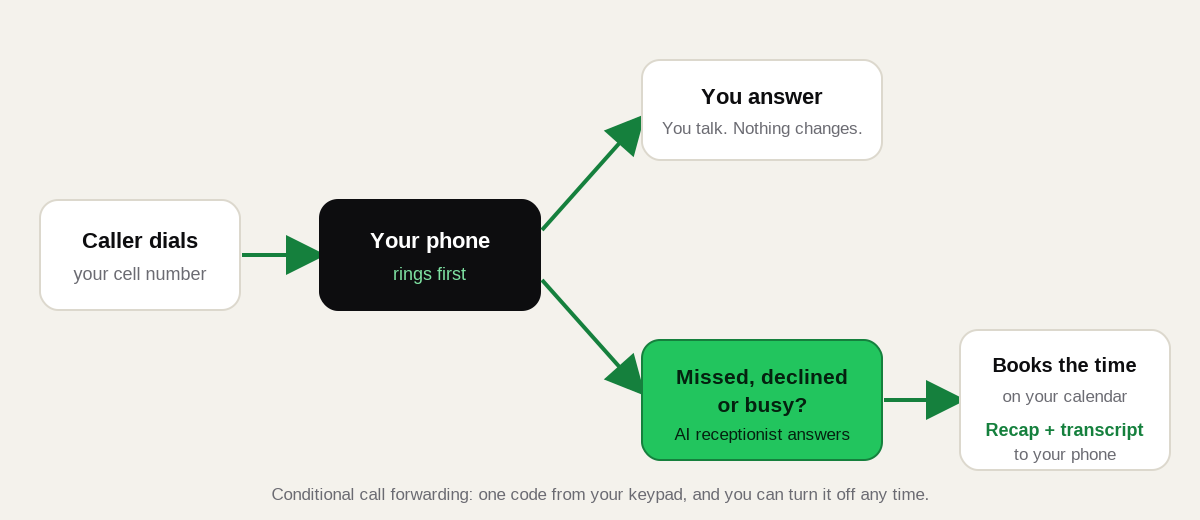
The first question every agent asks me about an AI receptionist is some version of "Do I have to give up my number?"
No. You keep your number, your phone and your voicemail if you want it. The whole install is a feature your carrier already gives you, called conditional call forwarding, and you turn it on from your own keypad. Here's how, carrier by carrier, along with the test I make every agent run before they trust it.
This guide is part of why missed calls cost agents deals. If you haven't decided yet whether a receptionist is the right fix, start there.
What's the difference between call forwarding and conditional call forwarding?
Regular call forwarding sends every call to another number, and your phone never rings. Conditional call forwarding only moves a call when one of three things happens: you don't answer, you're already on a call, or your phone is off or out of signal. For an agent, conditional is the one you want.
Think about why. With regular forwarding, your past clients, your escrow officer and your kid's school all get the receptionist, even when you're sitting at your desk with nothing to do. That's backwards. You want to answer every call you can, and only hand off the ones you can't.
Carriers usually split conditional forwarding into three separate conditions:
| Condition | What it means | When it happens to agents |
|---|---|---|
| No answer | It rang and you didn't pick up | Showings, closings, driving, dinner |
| Busy | You're already on another call, or you declined it | Back-to-back calls, open houses, declining an unknown number |
| Unreachable | Your phone is off, in airplane mode or has no signal | Flights, dead zones, a dead battery |
Some carriers bundle all three into one code. Others make you set each one. Either way, you want all three pointed at your receptionist.
How do I forward missed calls on Verizon?
On Verizon, dial *71 followed by the 10-digit number you're forwarding to, then press call. That forwards calls you don't answer. To turn it off, dial *73. Verizon lists this on its own call forwarding support page.
So if your receptionist's number were 661-555-0100, you'd dial *716615550100 and press call. You should hear a confirmation tone or see a message, then the call ends on its own.
One warning, because it's an easy slip: *72 is the wrong code. On Verizon, *72 forwards every call, which means your phone stops ringing entirely. If your phone goes quiet after setup, that's usually why. Dial *73 and start over with *71.
Verizon also notes that forwarded calls count against your minutes if your plan isn't unlimited. Most agents are on unlimited plans, but if you're not, check before you turn it on.
How do I forward missed calls on T-Mobile?
T-Mobile uses a separate code for each condition. Each one starts with two stars, then a two-digit condition number, then the forwarding number, then a pound sign:
| Condition | Turn on | Turn off |
|---|---|---|
| No answer | **61*number# | ##61# |
| Unreachable | **62*number# | ##62# |
| Busy | **67*number# | ##67# |
Using the same example number, no-answer forwarding would be **61*6615550100# and then call. Do all three so nothing slips through.
T-Mobile also lets you set how long your phone rings before the no-answer forward kicks in, from about 5 to 30 seconds. If you want a few extra rings to grab your phone out of your pocket, ask T-Mobile to lengthen the delay.
These codes come from T-Mobile's self-service short codes page. Carriers update these pages, so run the test at the end of this guide after you dial them.
How do I forward missed calls on AT&T?
AT&T wireless customers have two ways to do it. The first is your phone's menu. On Android, that's the Phone app, then Settings, then Calling accounts, then your SIM, then Call forwarding, where you'll see When busy, When unanswered and When unreachable as separate switches. That's the route AT&T's own device support pages show.
The second is dial codes. Google's Voice help page lists these for AT&T:
| Condition | Turn on | Turn off |
|---|---|---|
| No answer | *61*number# | ##61# |
| Unreachable | *62*number# | ##62# |
| Busy | *67*number# | ##67# |
Notice the pattern: same 61, 62 and 67 condition numbers as T-Mobile, with a single star in front instead of two. That's because both carriers run on the same underlying phone standard.
If either route gives you trouble, call AT&T support and say these exact words: "I want conditional call forwarding on no answer, busy and unreachable, to this number." They can set it on the account side.
What about iPhone, Android and prepaid carriers?
The dial codes work from any phone's keypad, iPhone or Android, because the code goes to your carrier, not to the phone. That's the simplest route on an iPhone: use your carrier's code.
Android phones also have a Call forwarding menu with separate switches for busy, unanswered and unreachable. Menus vary by phone maker, so if you don't see it where I described above, search your phone's settings for "call forwarding."
One Android gotcha straight from Google's help page: if you use the Pixel's Take a Message feature, carrier conditional forwarding may not work with it. Turn that off. The same goes for any call screening feature that answers calls before they ring out. If something on your phone answers first, the forward never fires.
Prepaid brands such as Cricket, Metro and Visible run on the big carriers' networks, but their codes and rules can differ. I haven't verified theirs, so check with your carrier directly.
How do I test call forwarding before I trust it?
Borrow a second phone and run three calls. If all three end with a real answer, you're done. If any one fails, you've found the gap before a seller did.
- The ring-out test. Call your cell and let it ring without touching it. The call should roll over to your receptionist after the rings.
- The decline test. Call again and hit decline. It should roll over right away.
- The busy test. Get on a call with someone else, then have the second phone call you. It should roll over instead of going to voicemail.
For extra credit, put your phone in airplane mode and call it once more. That's the unreachable path.
When we set up Agent Voice Pro for an agent, I walk through this test on the onboarding call, live. It takes about five minutes, and it's the most important five minutes of the whole setup. Everything else, from what your receptionist says to which calendar she books into, depends on calls actually reaching her.
Do I need to tell callers their call is being forwarded?
You don't need to announce the forward itself. The caller dialed your number and reached your assistant, the same as reaching a receptionist at an office. What you do need to handle is what happens next: if the call is recorded, California generally requires everyone's consent.
That's why the receptionist should open by saying she's an AI and that the call is recorded. That's the opening we recommend. I break down which laws apply, and which ones people mistakenly think apply, in California call recording and your AI receptionist. Check with your broker or a California real estate attorney about your own setup.
What happens to my old voicemail?
It stays exactly where it is, and you can go back to it any time. Turning off conditional forwarding with your carrier's off code puts everything back the way it was: missed calls go to your regular voicemail again.
That's why I like this setup. Nothing is permanent and nothing sits between you and your clients that you can't switch off from the parking lot. Write the off code in your phone's notes the day you set it up.
A lot of agents run it during the busy season and keep it running from there. Once you've read a week of recaps, voicemail starts to feel like a step backward. If you're still weighing the options, compare them in AI receptionist vs. ISA vs. answering service.
Questions agents ask
What is conditional call forwarding?
It's a carrier feature that forwards a call only under certain conditions: when you don't answer, when you're already on a call, or when your phone is off or out of signal. Regular forwarding sends every call away, which is not what you want.
Will my phone still ring if I set up forwarding?
With conditional forwarding, yes. Your phone rings first. The call only moves to your receptionist if you let it ring out, decline it, or you're on another call.
Does call forwarding cost extra?
It depends on your carrier and plan. Verizon says forwarded calls are billed against your minutes if your plan isn't unlimited. Most agents are on unlimited plans, but check your own plan or ask your carrier.
How do I turn call forwarding off?
On Verizon, dial *73. On T-Mobile and AT&T, the off codes start with two pound signs, such as ##61# for no-answer forwarding. On Android, you can also switch each condition off in the Call forwarding menu.
Can I forward calls on an iPhone?
Yes. The carrier dial codes work from the iPhone keypad, the same as any other phone. For conditional forwarding, use your carrier's codes rather than a settings menu.
Why do my calls still go to voicemail after I set up forwarding?
Usually because voicemail picks up before the forward kicks in, the code was entered for the wrong condition, or a phone feature such as call screening answers first. Test each path, and if one fails, call your carrier and ask them to set conditional forwarding on the account.
Hear what your callers would hear.
Clarice is the demo receptionist on our home page. Call her, pretend you're a seller, and try to stump her. Then book fifteen minutes with Connor if you want one of your own.